
Quasar Trading Terminal 1.0.2 released
The first stable version of the Quasar trading terminal is available in four builds for Windows, macOS and Linux.
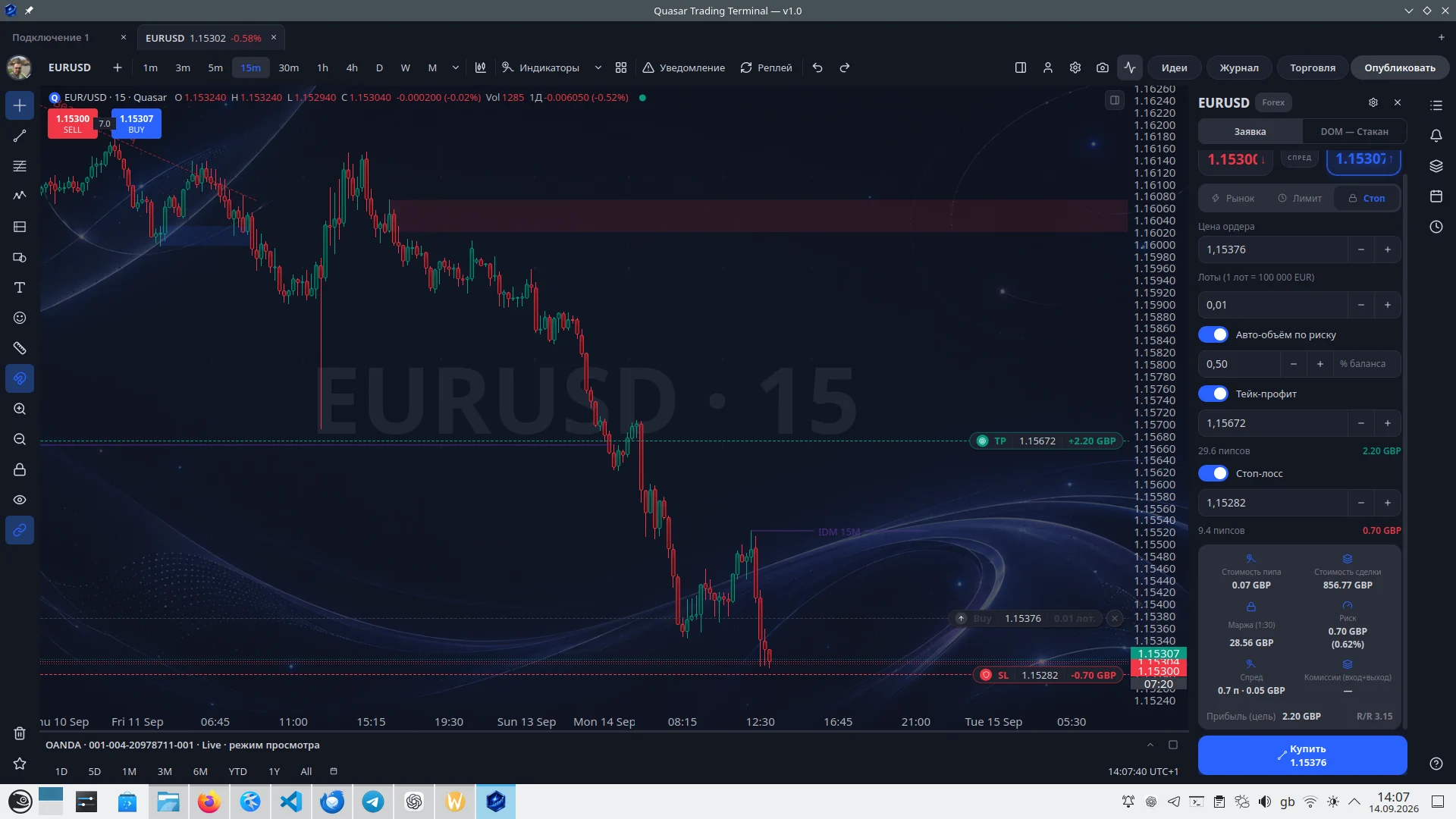
What Quasar Trading Terminal is
A desktop trading terminal written entirely in C++20 and Qt 6. Not a browser in a shell and not a web page in a window: a native application that draws the chart itself and lives on the trader's machine.
The terminal brings together in one window three things that usually live apart: work with the market, the trade journal and the rules of risk. Keeping them in separate programs and spreadsheets is the main reason rules are obeyed on paper and broken in a trade.
What it can do
- A candle chart with drawing tools and our own indicator language, QuasarGen Script.
- History replay: bars play back as if live, to train the decision rather than the memory.
- Orders straight from the chart — market and pending, with the price checked before sending.
- An idea as an executable trading plan: the chart frame is frozen at the moment of publication.
- An economic calendar and live quotes.
- Two interface languages — Russian and English.
The trade journal and risk management
The limits are set in advance: per trade, per trading day and per week — by prop-firm rules, with the day starting at 17:00 New York time. While you are inside them, the terminal keeps quiet. At 80 % of a limit it warns. Once a limit is spent, it asks for confirmation before every order: it does not forbid the trade, it makes you answer to yourself why you are taking it.
The journal keeps itself: a trade comes from the broker instead of being typed in by hand. A trade that has not been reviewed stays in sight as unfinished business — what makes discipline is what reminds you every day.
Connecting to brokers
The terminal connects to a broker directly, through our own adapter for its API: there is no server of ours between you and the broker, the orders go from your machine. OANDA and Bybit are connected today, and there is a paper account with its own quote stream — practice without money.
The broker key stays on your machine. With encryption on, the file is encrypted with AES-256-GCM, and keys go into synchronisation as ciphertext already: the server has no passphrase and cannot read them.
Supported platforms
- Windows 10 and 11, x64 — an EXE installer.
- macOS 12 and newer — separate DMG images for Apple Silicon and for Intel.
- Linux x86_64 — an RPM package, Qt 6.5 and newer.
About 20 MB on disk after installation and around 160 MB of memory with one chart open.
What changed in 1.0.2
- The terminal reports its own crashes: the report is sent on the next start.
- The chart of an idea review no longer stays on the previous timeframe.
- The window title names the full version: it read “v1.0” while running 1.0.1.
Only the current version is available for download: the terminal checks its version at start-up, and an outdated one refuses to run.
Privacy and diagnostic data
Three things leave your machine, and all three are named. The sign of life — the reason, the version, the system, the language and a device fingerprint; it can be switched off in the settings. The crash report — the signal, the version and the call stack; after a crash it is sent on the next start automatically, without asking, and 1.0.2 has no separate switch for it. And whatever you told it to synchronise.
What is not in those messages: the instrument, the broker, the account number, volumes, trades, the balance, your drawings, your e-mail, your token. This is checked on every build by a separate test that looks for forbidden fields and turns red when it finds one.
Verifying the downloaded files
Windows may warn about an unknown publisher: the current build is not signed with a certificate yet. Next to every file we publish its SHA-256 checksum — it lets you verify that the file you downloaded matches the file published on the official Quasar site exactly.
A checksum confirms the integrity of the file; it does not replace a publisher's digital signature. We do not plan to sign on Windows for now; on macOS the developer signature is already being arranged.
Download the terminal
The Quasar Trading Terminal download page — four builds, SHA-256 sums and the version history.
Documentation
The terminal documentation — installation and updates, risk management, the journal and the review, brokers, the chart and drawing, replay, and the QuasarGen Script indicator language with a reference for every function. In Russian and in English.